



Short answer: Generator power is only safe for electronics when the setup is stable, dry, properly routed, and not being stressed by heavy motor loads or weak connections. If electronics are flickering, resetting, buzzing, or connected through wet or overheated cords, the safest move is to stop and reassess before damage occurs.
Many homeowners assume a generator is either “working” or “not working.” In reality, one of the most dangerous situations is when generator power is present but not stable enough for sensitive devices. Routers, modems, TVs, laptops, chargers, and other electronics often show the problem first. They flicker, reboot, disconnect, or behave unpredictably long before a larger appliance fails outright.
This visual guide is designed to help you make a fast, safer decision during an outage. It walks through the most important questions in the right order: visible instability, warm or buzzing connections, heavy motor loads, wet conditions, and safe placement. The goal is not to squeeze every device onto the generator. The goal is to determine whether the setup is stable enough to trust for electronics at all.
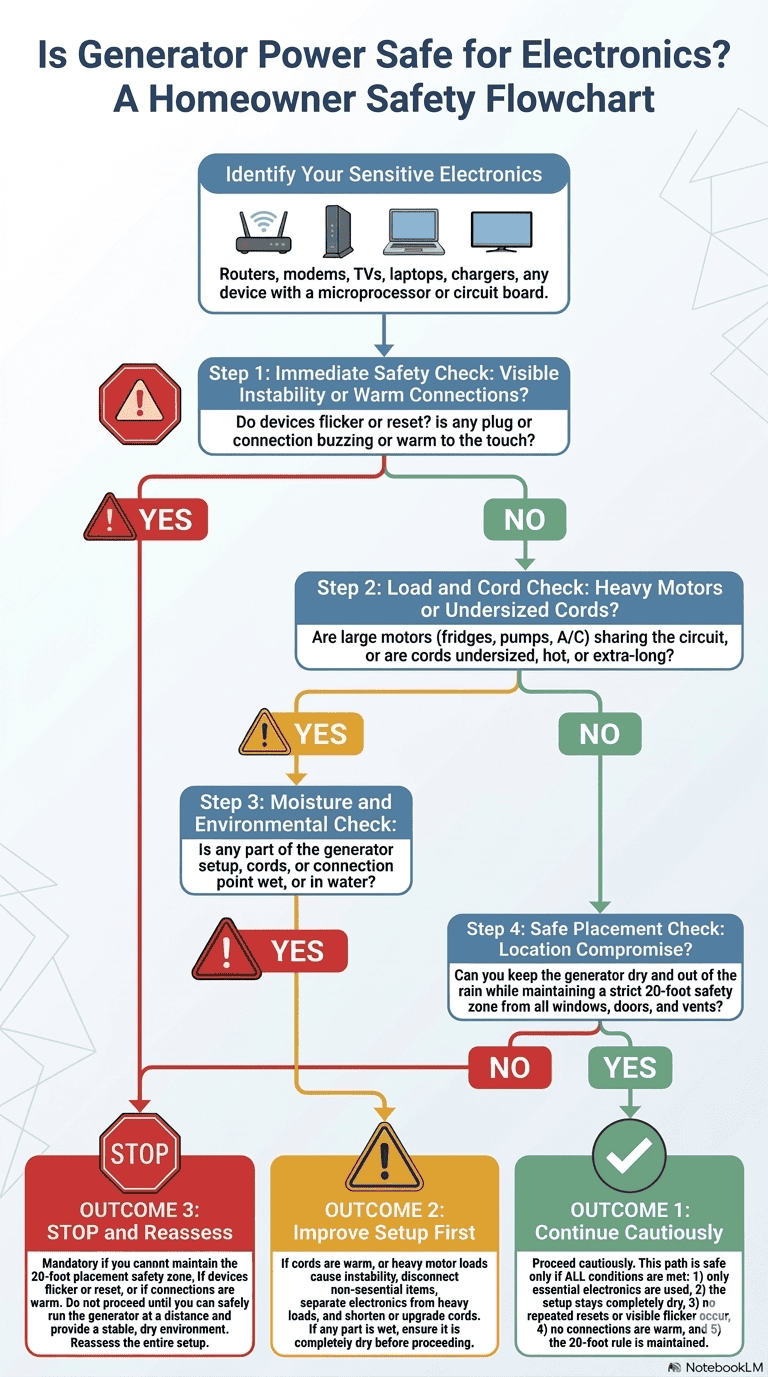
How to Use This Flowchart
This visual guide is meant to answer one specific question: is the generator setup stable enough for sensitive electronics right now? It is not a repair guide, and it is not a substitute for proper generator placement or electrical safety. Instead, it helps you recognize whether the current setup is showing warning signs that should not be ignored.
The flowchart starts with the most urgent symptoms first. If devices are already flickering or resetting, or if any plug or connection point feels warm or starts buzzing, you should treat that as an immediate warning. That kind of behavior usually means the power is unstable, the setup is overstressed, or a connection point is beginning to fail under load.
Why Electronics Show Trouble Before Bigger Equipment Does
Small electronics are often more sensitive to unstable generator power than larger appliances. A router or laptop charger may reset from a brief voltage dip that a lamp barely notices. A TV may flicker when a refrigerator compressor starts. A modem may disconnect repeatedly even though the generator still sounds normal outside.
That is why electronics are often the first useful warning signal. They reveal that the power is wobbling before the problem becomes obvious somewhere else. If you want the deeper explanation behind that behavior, read Generator Power Quality Explained: Voltage, Frequency, and Why Electronics Get Damaged.
Why Heavy Motor Loads Matter So Much
One of the most common causes of electronics instability on generator power is the startup surge from larger motor-driven loads. Refrigerators, freezers, sump pumps, dehumidifiers, and similar equipment pull extra current when they start. If the generator is already working hard, that startup moment can create a brief power dip that routers, TVs, and chargers feel immediately.
That is why the flowchart asks early whether heavy motors are sharing the same setup. Sensitive electronics should be kept on the lightest, steadiest part of the generator load whenever possible. When the same system is trying to support both delicate electronics and startup-heavy equipment, instability becomes much more likely.
Why Cords and Connection Points Can Quietly Undermine the Setup
Even when the generator itself is running normally, long or undersized extension cords can create voltage drop that makes electronics behave badly at the far end of the run. Weak adapters, poor plug contact, and heat at connection points can make that even worse. In practical terms, the electricity reaching the device may be much less stable than the power leaving the generator.
This is why the flowchart treats warm cords, buzzing plugs, and weak connections as meaningful stop signs. Those are not cosmetic issues. They often mean resistance is building where electricity should be moving cleanly. For the broader safety rules behind this part of the decision, see Generator Extension Cords: What’s Safe, What’s Not, and Why It Matters.
Why Moisture Changes the Decision Quickly
Rain and wet conditions do not just increase shock risk. They also make already-marginal setups worse. Damp plug ends, wet cord paths, and water-exposed connection points can interfere with good electrical contact and make voltage delivery less stable. That is why the flowchart includes a dedicated moisture and environmental check instead of treating rain as only a placement issue.
If part of the setup is wet, or if cords or connections are sitting in water, you should not keep treating it as a minor inconvenience. Moisture can turn a borderline system into an unsafe one very quickly. For the full weather-specific safety article, review Can You Run a Generator in the Rain? Safe Weather Protection Options.
The 20-Foot Rule Still Overrides Convenience
One of the most dangerous mistakes homeowners make is moving the generator closer to the house just to shorten cord runs or keep electronics working during bad weather. The flowchart treats that as a hard safety boundary for a reason. Generator placement should never be compromised to make a weak electronics setup more convenient.
If you cannot keep the generator dry while also maintaining safe distance from windows, doors, and vents, the correct answer is not to move it closer. The correct answer is to stop and reassess. Safe placement is still non-negotiable, even when the devices you are trying to protect seem small or low-draw. For the dedicated distance article, see How Far Should a Generator Be From the House? Safety Distances Explained.
What the Three Outcomes Actually Mean
Continue Cautiously does not mean “everything is perfect.” It means the setup currently shows no major instability, no warm or buzzing connections, no wet components, and no placement compromise. Even then, only essential electronics should stay connected, and the setup should be monitored as conditions change.
Improve Setup First means the problem may still be correctable without abandoning generator use entirely. In most cases, that means separating sensitive electronics from heavy motor loads, shortening cord runs, improving cord quality, or removing weak connection points before continuing.
Stop and Reassess is the correct outcome when the setup is already showing instability, heat, buzzing, moisture exposure, or unsafe placement pressure. At that point, continuing to run sensitive electronics can quietly damage devices even if nothing fails immediately.
Helpful Next Reads
- Generator Power Quality Explained: Voltage, Frequency, and Why Electronics Get Damaged
- Generator Voltage Too High or Too Low: Signs, Risks, and When to Stop Using It
- Why Electronics Reset or Flicker on Generator Power: Load Changes, Cords, and Regulation
- How to Protect Your Router, TV, and Computers During Generator Use (Without Overloading)
Final Takeaway
The safest generator setup for electronics is not the one that powers the most devices. It is the one that remains stable, dry, lightly stressed, and safely positioned throughout the outage. If your electronics are showing you signs of trouble, believe them. They are often the earliest warning that the setup is no longer safe to trust.